Connect your store today. Act on your first plan in five minutes tomorrow morning.
Refillo is built around a simple daily loop: read your latest sales and stock, check for missing product details, prepare orders on each supplier’s order day, let you review and send them in minutes, and measure how suppliers and suggestions actually performed.
Your first day with Refillo
Connect Shopify, Lightspeed X-Series, or the API
Link your Shopify store or Lightspeed X-Series account in Settings, or push catalog, stock, and sales through the Refillo API. Your store stays the source of truth for products, on-hand stock, and sales.
First sync and first plan run the same day
As soon as your first sync finishes, Refillo builds your first plan from the history your platform provides. While your store syncs, any screen lets you view our working sample shop (Maple Corner Market) so you never stare at an empty page.
Link suppliers for the products that matter most
On Today, a five-step checklist shows the products that bring 80% of your sales and helps you link their vendors to suppliers, set delivery times and order days, and send your first suggested order.
The eight-step daily loop
Every screen and every report in Refillo belongs to one step of this loop. If something goes wrong overnight (a location sends no data, an order email bounces), Refillo tells you at once on Today and by email.
| Step | When it runs | What it produces | What you see if something needs attention |
|---|---|---|---|
| 1. Data arrives | Every night and on webhooks or manual sync | Sales, stock on hand, receipts, list prices, and unit costs per location | Today's status line names any silent location; an email alert goes out at once |
| 2. Details checked | Before planning | Checks for missing suppliers, missing costs, or prices below cost | Missing product details lists what is missing and how much sales volume it affects |
| 3. Plan updated | Nightly | For each product and location: how it is handled, how much it needs, and when it runs out | Every product page shows the stock story, chart, and plain-English explanation |
| 4. Orders prepared | On each supplier's order day | Proposed supplier orders (and warehouse transfers), adjusted for pack sizes and supplier minimums | Listed on Today under Needs you and grouped by supplier in Order |
| 5. You decide | Morning | Review and send, edit a quantity (with a one-tap reason), or remind me later | Shows the exact email and PDF before sending; everything else has a 10-second undo |
| 6. Goods arrive | Per delivery | Received in full, partly received, or short | Deliveries tracks what is due today or late; differences feed the supplier scorecard |
| 7. Outcomes measured | Nightly and weekly | Whether shelves held, margin missed to empty shelves, and whether edits helped or hurt | Reports show suggestions taken, supplier on-time delivery, and stock by status |
| 8. Refillo learns | Nightly | Measured supplier delivery times, promotion lift, and forecast checks | Supplier pages compare promised delivery days against actual measured delivery days |
How Refillo handles different kinds of products
Not every item in a shop sells the same way. Refillo tells you on every product page how that item is handled and lets you change it whenever you know something the numbers do not.
Reordered from its sales
For steady sellers, Refillo sizes your spare stock from how daily or weekly sales vary over the time an order takes to arrive from that supplier.
Fresh & short shelf life
For bakery, produce, and dairy items with a shelf life in days, Refillo orders only for the days the product can sell before it spoils.
Sells slower than its pack
When an item sells slowly but the supplier only ships in packs of 6 or 12, Refillo orders a pack only when the shelf will empty before the next chance to order.
Seasonal & promotions
Out-of-season products sleep without generating unneeded orders, then build ahead of their season or planned promotion dates.
Not selling & stop reordering
When a product sits in stock for 45 days without a sale, Refillo stops ordering more and helps you mark it down, return it, or stop reordering.
Through your warehouse
If you have a central warehouse, stores order from the warehouse and the warehouse’s supplier order is built from the sum of your stores’ needs.
Supplier scorecards and earning your trust
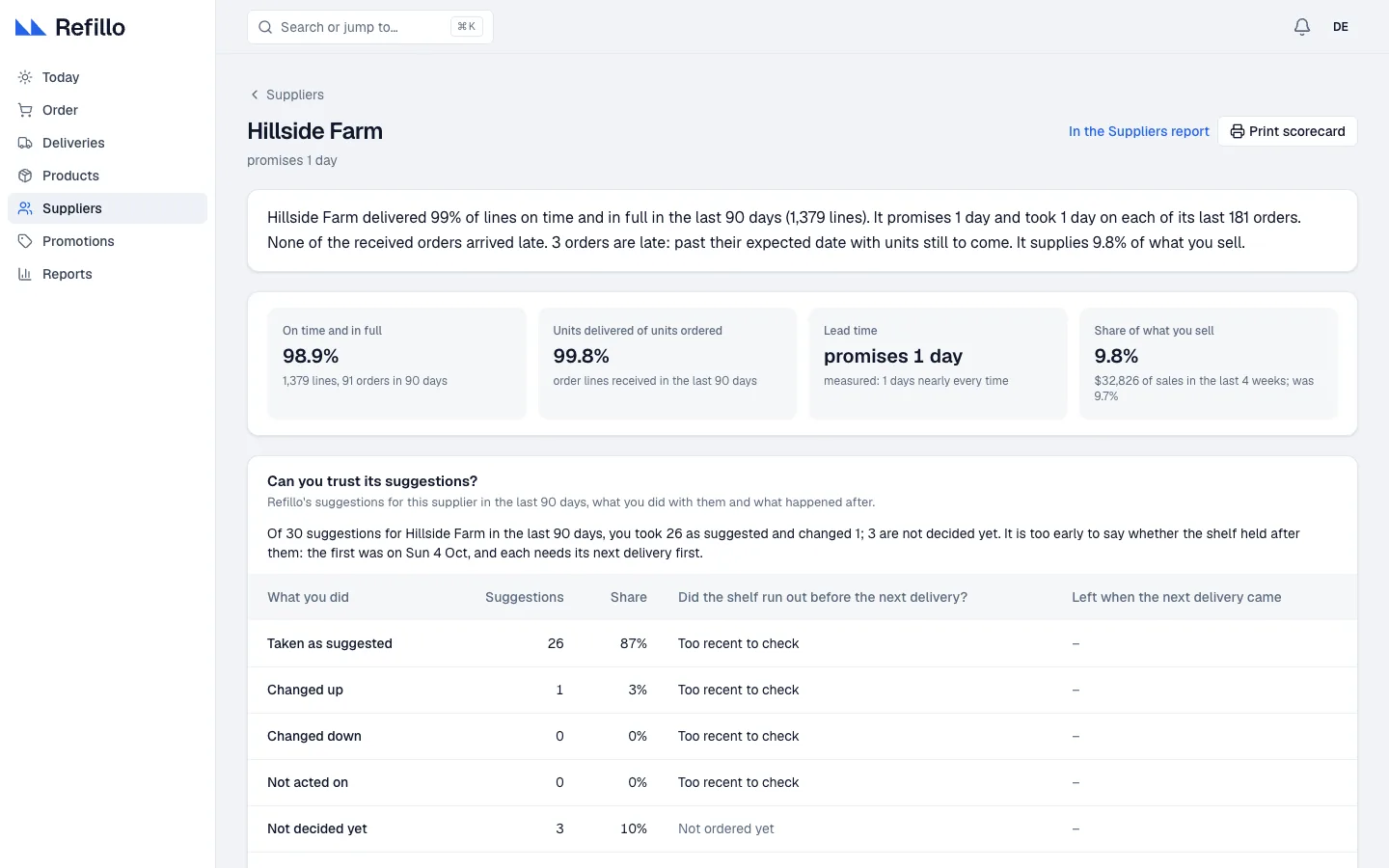
Refillo never asks for blind trust. Every supplier has a scorecard showing lines delivered on time and in full, units delivered of units ordered, measured delivery days against promised days, and its share of your shop’s sales, margin, and stock money.
“Hillside Farm delivered 99% of lines on time and in full in the last 90 days (1,379 lines). It promises 1 day and took 1 day on each of its last 181 orders. It supplies 9.8% of what you sell ($32,826 of sales in the last 4 weeks).”
Right below the delivery record, Refillo shows every suggestion it made for that supplier over the last 90 days, how many you took unchanged, and whether the shelf held until the next delivery.
See what Refillo finds in your shop
Connect your store in minutes and get your first replenishment plan the same day.